

My TrackPoint drifts. Not dramatically, but if I take my hands off the keyboard the pointer wanders off towards the top-left corner like it has somewhere better to be. It has done this on and off for months, and I finally sat down to fix it properly rather than nudging the cursor back every few minutes.
The received wisdom is that Linux exposes a drift-correction setting in sysfs, and you raise it. So I went looking for it.
$ cat /sys/devices/platform/i8042/serio1/drift_time
cat: .../drift_time: No such file or directory
That is where the afternoon started, and it turned out the missing file was the interesting part.
The knob is only there for some people
The kernel’s trackpoint driver does support drift_time. It is the window the firmware waits before deciding the stick is at rest and re-zeroing it. But the driver only exposes its full set of attributes for genuine IBM TrackPoints. Look at what my machine reports:
N: Name="TPPS/2 Elan TrackPoint"Elan. Not IBM. Same for ALPS and NXP sticks, which between them cover most ThinkPads built in the last several years. On those variants the driver offers exactly two settings, sensitivity and press_to_select, and nothing else. Drift correction still happens, but it happens in firmware where nothing in userspace can reach it.
So every guide telling you to tune drift_time is correct and useless at the same time, depending on which stick you happen to have. Nobody mentions this, and the failure mode is a file that simply is not there, which reads as “you typed the path wrong” rather than “your hardware does not have this”.
Then the middle button annoyed me too
While I was in there I decided to fix a second irritation. On a ThinkPad the middle button does two jobs: hold it and the stick scrolls, click it and X pastes whatever you last selected. I want the scrolling. I have never once wanted the paste, which mostly manifests as dumping half a config file into a terminal because my thumb brushed something.
These feel like one setting. They are two, and they live in different places.
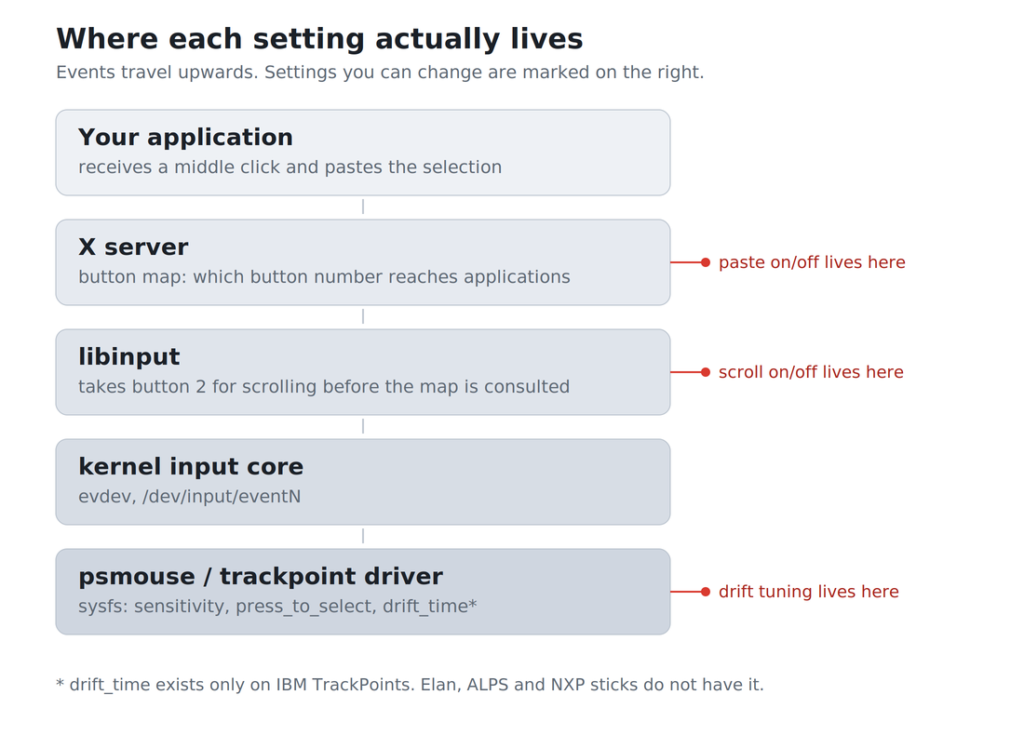
Pasting is the X server’s button map delivering button 2 to applications. Scrolling is libinput taking that same button first, before the map is ever consulted. Because libinput gets there first, you can switch off the paste without losing the scroll:
$ xinput set-button-map "TPPS/2 Elan TrackPoint" 1 0 3 4 5 6 7The zero in the second slot disables button 2. Scrolling survives because libinput consumed the press before the map applied, and because scroll events travel as buttons 4 to 7, which that command leaves alone.
It did not work. I ran it, and middle-click carried on pasting.
The button was not where I thought it was
The physical buttons under a TrackPoint are not necessarily reported by the TrackPoint. On plenty of ThinkPads they belong to the touchpad device instead. I was remapping a device that was not sending the click, which fails completely silently: the command succeeds, the map changes, and nothing about your machine behaves differently.
The way to find out is to watch the raw event stream and click:
$ xinput test-xi2 --root
EVENT type 4 (ButtonPress)
    device: 12 (12)
    detail: 2
Device 12. My touchpad. Remap that instead and the paste stops.
So I wrote a thing
By this point I had a text file of half-remembered commands and no way to tell whether any of it had helped. Every setting was in a different place, some needed root, none of them survived a reboot, and the one number I actually wanted to watch, how much the pointer moves when I am not touching it, was not something I could see at all.
So I built ThinkPoint, a terminal interface for the lot of it. It is Rust, it is about three thousand lines, and it does four things I could not do before.
It measures the drift. Press m, take your hands off, and it reports movement per second per axis, read from the device’s own valuators before pointer acceleration is applied. That distinction matters more than it sounds: a reading of zero while the cursor still creeps means the hardware is fine and something above the driver is to blame. I spent an hour tuning a stick that was not the problem before I had that number.
Press d and click a button, and it names the device that actually sent it. That is the two-minute version of the test-xi2 dance above, and the reason I stopped remapping the wrong hardware.
Paste and scroll get a switch each, applied together, so you can have either, both or neither.
And it makes things stick. sysfs values go into a udev rule, which survives a reboot and, unlike a login hook, a suspend and resume cycle. The X-side settings go into a profile that gets replayed at session start, because udev cannot reach them.
What it will not do
It will not fix drift on an Elan TrackPoint, because nothing in software will.
What it can do is lower sensitivity, which does not stop the creep but scales down the motion the same spurious force produces. On my machine that was enough to stop me noticing. It is a workaround and the status bar says so rather than implying otherwise, which was a deliberate choice: a tool that quietly pretends to have fixed something is worse than no tool.
Past that the causes are physical, and worth knowing because they are cheap to check.
A worn or badly seated cap is the most common one by a distance. A split cap, or grit under it, puts a constant off-centre load on the sensor and no amount of software will argue with that. New caps cost about the same as a coffee.
Then there is recalibration. The stick re-zeroes itself when it detects no force on it. Rest a finger there while that is happening and it latches a bad zero and creeps until it gets another chance. Lift off completely for a few seconds. Drift just after boot, or as the machine warms up, is the same thing: the strain gauges are temperature sensitive and it settles on its own.
Then firmware. Lenovo has shipped TrackPoint calibration fixes in BIOS updates more than once, which is worth checking before you conclude the hardware is dying.
And if it drifts in the BIOS setup screen as well, it is not a software problem at all and you are looking at a keyboard assembly.
Try it
ThinkPoint is on the AUR and on GitHub, MIT licensed. It works on any Linux machine with pointer devices, though everything device-side needs X11; under Wayland you get the sysfs tab and nothing else, because there is no equivalent of a per-device button map to configure from outside the compositor.
$ yay -S thinkpointIf your TrackPoint drifts, start by pressing m and finding out whether it is really the stick. That one number would have saved me most of an afternoon.
GitHub link: https://github.com/CryptLabs/ThinkPoint